Gallery#
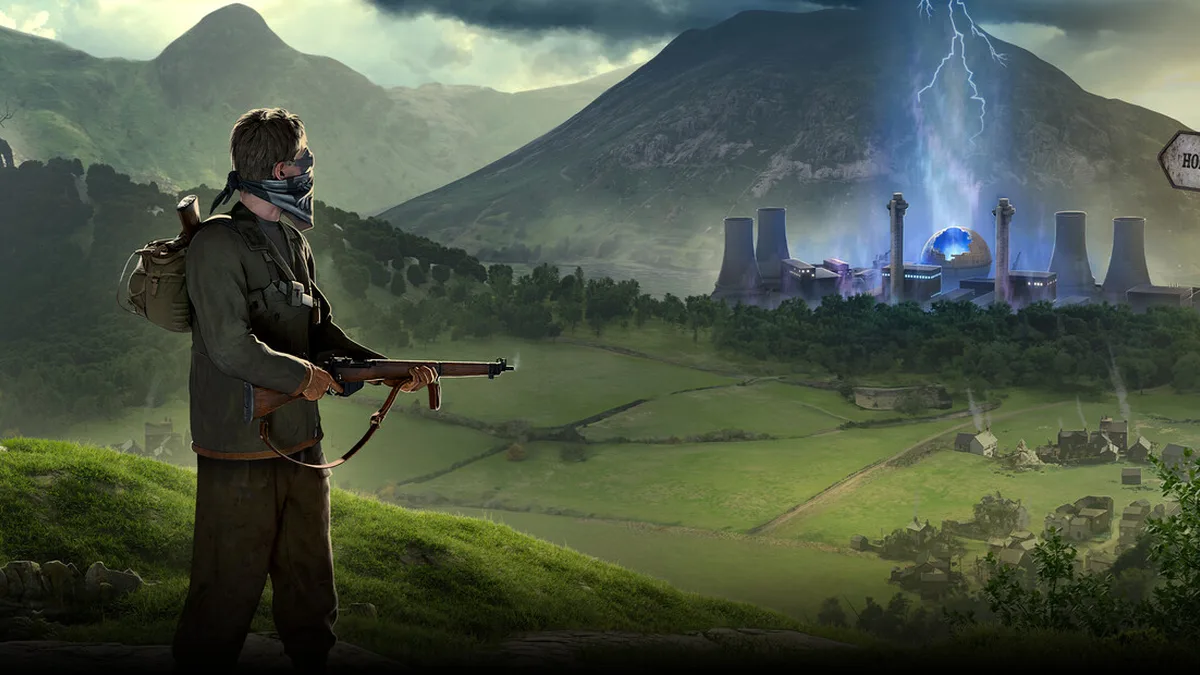
Atomfall is a survival action game developed and published by Rebellion Developments, released on March 27, 2025 for PC, PlayStation 5 and Xbox Series X|S, running on the in-house Rebellion Engine. Its subject matter is rare for the genre: rather than rendering the rusted highways and neon wreckage of an American wasteland, it takes the 1957 Windscale fire — the worst nuclear accident in British history — as its basis and places the action inside a quarantine zone cordoned off by the government. The section homepage sums up this character as “atompunk: a uniquely British nuclear wasteland aesthetic”, and that sentence is the starting point for every appreciation criterion on this page.
This page is not a gameplay tutorial. It answers three questions only: what is worth looking at in this game’s imagery, how to judge whether a screenshot works, and what process reliably captures the shot you want. Wherever the section material cannot confirm a specific name for a location or object, this page describes it by “features and criteria” instead and invents nothing; for mechanical breakdowns and keybinding details, jump straight to the further reading at the end.
Visual skeleton: what to shoot in each of the five location types#
The section homepage gives a clear description of how the quarantine zone is built up: villages, forests, underground facilities and military bases, plus the Soviet-style bunkers and research facilities running through the background. These five location types form the visual skeleton of the whole game, so classify by type first and then decide on composition:
| Location type | Identifying criteria | Themes worth showing |
|---|---|---|
| Village | Lootable crates and cupboards, workbenches, safe houses — traces of long-term living | Survival order and everyday life, in contrast to the idea of a “nuclear wasteland” |
| Forest and woodland | Dense sight blockers, suited to crouching stealth and backstabs | Stealth atmosphere, foreground and background layering |
| Soviet-style bunker | A sealed underground space of iron doors, pipework and concrete | The oppression of an enclosed space and its period texture |
| Military base | Standardised fortifications and watch structures | Orderly threat, set against scattered scavenger traces |
| Research facility | Mysterious spaces tied to “uncovering the hidden truth” | The location type carrying the strongest narrative tension |
Three of those types each have a composition approach you can apply directly:
- Village: put the workbench, the safe house or a character mid-loot in the middle distance, and let “daily life still running” be the subject of the frame.
- Underground bunker: use iron doors and pipes as a foreground frame, compress the depth, and push the sense of enclosure to the very front of the image.
- Woodland: drop the camera low to a crouched eye level and use the dense cover to hide a patroller’s silhouette between foreground and background.
The advanced route on the section homepage places the first 5 hours of the game squarely in Windscale Valley: explore the safe areas, gather basic materials, set up a safe house, and do not push into high-radiation zones. That makes Windscale Valley the most concentrated location for the “everyday life” side of the game, while the closer you get to high-radiation areas, the colder and tighter the visual language becomes — and that gradient from calm to oppressive is itself the visual through-line most worth documenting.
Interface as narrative: the HUD carried by four survival states#
Unlike most action games, which only manage a health bar, Atomfall’s mechanics overview lists four parallel survival states, and they write “how a person stays alive in the quarantine zone” directly onto the interface:
| State signal | Interface basis | What it says in the frame |
|---|---|---|
| Radiation | Accumulates in contaminated areas; cleared with anti-radiation drugs | The game’s signature survival pressure, and the core motif of shooting in contaminated zones |
| Hunger | Requires eating to maintain stamina | The fragility that follows a long expedition |
| Health | Injuries need treatment; serious ones need a medical kit | The most direct footnote on the cost of fighting |
| Encumbrance | Being overburdened lowers move speed and stamina recovery | The satisfaction and the drag of a successful loot run, at once |
Beyond those four, two more kinds of information sit permanently on screen: weapon durability (weapons wear down with use and need repairing at a workbench) and stealth state (crouching lowers the chance of being spotted, and a backstab can drop a target outright); the quick consumable slots map to number keys 1-4 (D-pad on a controller), which is the direct on-screen projection of this game’s habit of “checking your supplies before you step out”.
When you are appreciating or shooting, treat these states as part of the visual information: a character walking down a village lane at full encumbrance tells the whole story of a loot run by itself; hitting the shutter at the moment radiation pressure climbs says more about the nature of this land than any filter. Checking that food, water and medical supplies are sufficient before leaving a safe area is both survival discipline and the precondition for “not having your shoot interrupted by a survival crisis”.
Period texture: the weapon gradient is the art gradient#
The weapon recommendation tier list on the section homepage is itself a summary of the art direction: melee and firearms mixed together, rising step by step from civilian to military, which mirrors the survival design of “scarce resources early on”. Read from C tier to S tier in acquisition order and the language of materials and workmanship changes along with it:
| Gear tier | Melee examples | Firearm examples | Visual texture |
|---|---|---|---|
| C | Wooden stick, fists | Makeshift pistol | Improvisation and emergency — the survival baseline of the early quarantine zone |
| B | Iron pipe, nail-studded baton | Revolver, semi-automatic pistol | Period traces of cobbled-together civilian gear |
| A | Machete, fire axe | Assault rifle, submachine gun | The transitional mix of civilian tools and military hardware |
| S | War hammer, stun baton | Hunting rifle, shotgun | The last-resort option in high-threat situations |
Following that thread into equipment detail pays extra dividends: a worn weapon lying on a workbench next to freshly looted materials is this game’s most typical “survival still life”. By the same logic, crafting a lockpick as early as possible is compulsory here, and both the instant a lock turns and the moment a locked container swings open belong in a collection — the Reddit r/Atomfall community has noted a locked chest in the church basement containing valuable items, a textbook subject for that “the lock gives way” shot.
Light and timing: two shooting windows from the day/night cycle#
The mechanics overview describes the day/night cycle like this: at night enemy vision is reduced, but some enemies are more active. From that you can split out two very different shooting windows:
- Daytime window: visibility is good, which suits wide shots and architectural detail in “ordered” locations such as villages and military bases; the cost is that alarms trigger more easily, so plan your stealth route before you start shooting.
- Night window: enemy vision is reduced and stealth state is more stable, which suits stealth atmosphere and enclosed spaces; but some enemies are more active at night, so time the shutter by whether your stealth state is stable rather than simply waiting for dark.
Both criteria share one principle: treat “safe” as a precondition of composition. Mechanically, crouching lowers the chance of being spotted and a backstab drops a target outright — combat frames tend to come with hit feedback and interface prompts, so composing after stealth has stabilised gives you much cleaner images. That is also the visual extension of the “stealth first” beginner tip.
Narrative threads in frame: tapes, documents, factions and hidden areas#
A gallery collection should not only stare at scenery; Atomfall’s narrative material is distributed through the frame as well:
- Tapes and documents: scattered throughout the quarantine zone, containing important clues and codes — you can capture the act of flipping through a document or listening to a tape, which loads the frame with information.
- Factions and reputation: you interact with multiple factions and your choices shape where the story goes, while faction reputation affects trade and quests; the differences in scenes between different alignments are worth collecting across multiple playthroughs.
- Hidden passages and secret areas: the beginner tips state plainly that hidden passages and secret areas usually hold the best loot — and the entrance itself is often a good frame. The Steam community has noted a cave behind a waterfall holding a legendary machete, but it requires advancing the relevant quest line first, which makes it ideal for “explore and be rewarded” photo sequences.
- Corners that respawn: the Discord community has noted that the scrapyard on the east side of the industrial district refreshes its materials every 3 days — shoot the same camera position again a few days later and you get the sense that the quarantine zone is still running.
Shot list arranged by progression#
The main story runs roughly 20-30 hours and full completion over 50 hours, so there is no need to treat photography as a separate schedule — the advanced route on the section homepage is enough to plan around, and each stage has a different focus:
| Time block | Shot focus | Criteria |
|---|---|---|
| Hours 1-5 | Daily life and the safe house in Windscale Valley | Establish the “wasteland with order” tone; collect workbenches and looting still lifes |
| Hours 5-15 | Abandoned woodland and the first decent firearms | The main production window for stealth atmosphere shots |
| Hours 15-25 | Faction outposts and quest locations | Compare the differences in scene and people between alignments |
| Hours 25-35 | Military zones and research facilities | The two location types with the strongest sense of oppression |
| After hour 35 | Wrap-up and full completion | Backfill entrances and loot shots for hidden passages and secret areas |
Screenshot workflow: from map planning to pressing the shutter#
- Plan composition with the map first: on PC press M (the View button on a controller) to open the map, sort the scenes you want into the five skeleton types above, and plan high ground and entrances along the way; the map screen itself is a primary source on the terrain of the quarantine zone.
- Check the interface options: go into settings and confirm item by item whether an interface-hiding option or a dedicated photo mode is offered; if it is, turn the interface off when shooting; if it is not, frame with as little interface information as possible.
- Stealth first: do not fight if you do not have to — the ammo and medicine that stealth saves are themselves part of the “scarce resources” story the frame is telling.
- Use the platform screenshot features: PC players can use Steam’s screenshot hotkey, while the PlayStation 5 and Xbox Series X|S controllers each have a system-level capture button, so you never have to quit the game.
Before you press the shutter, run through six self-checks: is the location classified; is one of the four survival states telling a story; do the gear tier and material language match; is interface information already minimal; are stealth state and exit route under control; and have you kept the same camera position at locations that respawn. Reshoot anything that fails, and only keep the frames that pass all six.
Further reading#
- Systems Explained — the mechanical breakdown, for understanding where the interface and survival systems come from
- Tips Guide — the basis for stealth and resource management decisions
- Controls and Settings — the keybindings and settings to confirm before shooting
- Walkthrough — tick off the shot list as you push the main story
- Challenges — extra objectives beyond the main story
- Version Updates — content changes that may affect shooting details
- Useful Resources — a roundup of community and reference entry points
Beyond the shoot#
The most affecting thing about this game is not any single frame, but the unease of placing “an English village where daily life still runs” alongside “a nuclear disaster that is invisible yet everywhere”. The quiet of Windscale Valley, the chill behind a bunker’s iron door and the audio cue as the radiation bar climbs are all telling the same story.
Remember that when you take screenshots and the framing takes care of itself: what you are recording is not a good-looking wasteland, but an ordinary England interrupted by disaster and still trying to carry on.