Gallery Highlights#
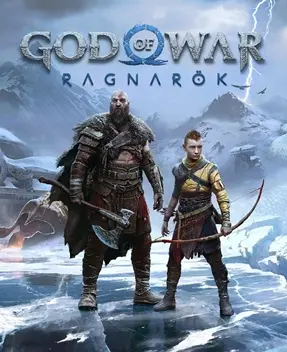
This page takes an art and visual appreciation angle, outlining the recognizable traits of God of War Ragnarök across its Nine Realms scenery, character factions, weapons, and enemy design, and giving practical criteria for taking great screenshots with the game’s built-in Photo Mode. Specific place names, characters, and mechanics mentioned here follow what the game actually shows.
The Art Direction of the Nine Realms#
The nine realms of Ragnarök are not one asset set reskinned; each realm has a clear visual identity in palette, terrain, and climate — the differences most worth exploiting in screenshot compositions.
| Realm | Palette | Terrain & Climate | Visual Motif |
|---|---|---|---|
| Midgard | Cold gray and ice blue | Snowbound under Fimbulwinter; frozen lakes, bare trees, snowy cliffs | A desolate homeland, ruins around the Lake of Nine |
| Alfheim | Gold and green | Light Elves’ sands and oases, light streaming through temples | The opposition of light and dark elf civilizations |
| Svartalfheim | Dark brown and orange-red | Dwarven mines and waterways, caves and forge fire | Layered sluices and carved veins |
| Vanaheim | Emerald and deep rainforest green | Jungle, swamp, and volcanic belt interwoven; the largest realm | Wild nature and Vanir magic foliage |
| Helheim | Pallid white and frost blue | The dead realm’s icefields and corridors of souls | Translucent spirits and cliffs |
| Muspelheim | Lava red and black | Volcanic craters and burning crags of the fire realm | Seething lava of the endgame trial grounds |
| Niflheim | Gray-green mist | A rift zone wrapped in thick fog | Trial paths looming in and out of the mist |
| Jötunheim | Paintings on giant walls | Murals and giant ruins, story-only | Scrolls recording prophecy and giant history |
| Asgard | Gold-white and thunder gray | The gods’ halls and golden palaces, site of the final battle | Splendor under pressing storm clouds |
One practical shooting rule: Midgard and Helheim suit stark, solemn loneliness, while Vanaheim and Muspelheim suit saturated colors that highlight heat and vitality. Lighting in the same scene can differ before and after story progress — worth experimenting on the way back.
Visual Design of Kratos and the Core Cast#
Kratos and Atreus’s visual symbols carry over and evolve in Ragnarök, and they are the two characters most often used in compositions.
| Character | Appearance | Visual Symbols | Movement & Action Language |
|---|---|---|---|
| Kratos | Bald, ashen skin, red tattoo from eye to torso | The Leviathan Axe’s frost aura, the Blades of Chaos’s fire embers | Heavy, weighty swings and ground slams |
| Atreus | Boyish frame, tied-back dark hair | Glow of bow shots and runic summons | Nimble, ranged shooting rhythm that keeps distance |
| Freya | Long hair, Vanir-style dress | Nature magic and feather motifs | Light, drifting casting poses |
| Odin | Elderly frame, bearded | Golden raven clones and runic radiance | Composed, restrained control-type movements |
| Thor | Burly build, red hair and thunder hammer | Lightning blue and Mjölnir | Huge, thunderous heavy strikes |
| Týr | Towering body, multi-weapon switching | The war god’s shield and many blades | Calm, varied weapon stances |
For shots, use the moment a character stands facing the camera, or the frame where ability effects peak around them, to amplify visual tension. Kratos’s red tattoo forms natural subject contrast against cold backgrounds — well suited as the frame’s focal point.
How the Weapons Differ Visually#
The three main weapons differ clearly in model silhouette and attached VFX — prime subjects for close-ups and feature shots.
| Weapon | Silhouette | Attached FX | Shootable Moments |
|---|---|---|---|
| Leviathan Axe | Short-hafted heavy axe, frost-etched blade | Ice-blue chill | The throw release, the freeze instant of a frost smash |
| Blades of Chaos | Twin blades on chains, linked at the rear | Orange-red fire embers | Spinning crowd clears, the burst frame of a fire explosion |
| Draupnir Spear | Thrown spear, head that splits open | Gold or lightning | The skewer, the volley of a full spear barrage |
Watching the same weapon’s upgrade tiers and armor sets also changes surface materials and inscription details — the same weapon is worth comparative shots at different levels. To feature a weapon up close, wait for the pre-combat ready stance or use Photo Mode’s depth of field to blur the background.
Reading Enemies and Look-Alike Factions#
Ragnarök’s enemies sort clearly into factions by looks; reading their silhouettes helps you predict their behavior mid-fight and gives combat screenshots a clearer subject.
| Enemy Type | Looks | Common Behavior Tells | Where Found |
|---|---|---|---|
| Undead warriors | Gray, decayed bodies with axes or shields | Straight-line approach; blockable and parryable | Helheim, Midgard |
| Raven-touched mutants | Wing motifs tied to the Thor/Odin forces | Often in packs; ranged — interrupt their charge-ups | Asgard-linked areas |
| Vanir/elf types | Nature or light/dark attributes in their forms | Elemental attacks; counter with matching weapons | Alfheim, Vanaheim |
Note that specific enemy names and skill details are beyond what this page can individually verify, so only looks and behavior traits useful for combat and composition are given here — no unverified exclusive names are listed.
Visuals and HUD Information Hierarchy in Combat#
Understanding how the game’s camera and interface information are built helps you decide which elements to keep and which to hide when shooting.
| On-Screen Element | Function | Shooting Advice |
|---|---|---|
| Central characters and enemies | Combat subject | Composition core; keep it |
| Bottom health and rage bars | Status info | Stylized, but blocks the lower frame |
| Objective markers and quest prompts | Navigation info | Hide for landscape shots |
| Loot/interaction prompts | Input feedback | Clutter; clear them |
Climactic combat frames come with camera moves and hit VFX — such moments suit snapping attack poses. If the goal is a clean environment shot, quieter out-of-combat moments are more worthwhile.
Photo Mode Practical Criteria#
The game has a built-in Photo Mode usable for framing and finishing. The criteria below are organized as operational steps so you can actually shoot clean, focused frames.
| Stage | Operation | Target Effect |
|---|---|---|
| Enter | Open the pause menu in game and enter Photo Mode | Freeze the current frame for fine tuning |
| Camera | Move the rig with the stick or directions; orbit the subject | Find the angle that best shows the scene’s depth |
| Framing | Use the rule of thirds and negative space; don’t cram the edges | Give the frame breathing room and depth |
| Depth of field | Adjust lens blur; focus on the subject | Highlight the character or weapon; soften the clutter |
| Hide HUD | Toggle interface elements off for a pure frame | Clean environmental close-ups |
| Light timing | Pick moments with dramatic light (rain, snow, fire, storm) | Strengthen mood and atmosphere |
A few common pitfalls:
- Mid-fight frames are busy — great for action close-ups, poor for landscapes.
- After hiding the interface, confirm the subject is still inside the frame so the weight doesn’t shift.
- In extreme weather and strong light sources, watch that the subject isn’t swallowed by backlight.
When to Shoot Each Atmosphere#
Matching the realms’ light and weather, different scenes have their easier “keeper” windows and states.
| Scene Type | Best Timing | Shooting Focus |
|---|---|---|
| Snowfields and frozen lakes | Overcast skies, first flurries | Cold color layers and isolated silhouettes |
| Jungle and swamp | Humid rainforest, light through foliage | Emerald depth and mist |
| Mines and forges | Firelight on rock walls | Strong warm-orange versus shadow contrast |
| Volcano and lava | Flowing lava, flying sparks | Saturated heat and a sense of danger |
| Temples and sanctums | Light streaming in, statue silhouettes | Solemn, symmetric framing |
Closing Thoughts on the Gallery#
Ragnarök’s visual identity rests on its commitment to each realm’s own palette, its factions’ clear appearance symbols, and the three weapons’ utterly distinct light languages. Shooting frames with real texture comes down to pose, timing, and interface working together — not a vague chase of “pretty”. Observe each realm’s visual motif and lean on Photo Mode’s framing and depth tools, and your screenshots will truly capture this game’s singular artistry.