COD6 Gallery & Art Appreciation Guide#
Call of Duty: Modern Warfare 2 commits to a realistic military style — no fantasy or sci-fi elements — yet it stands as the series’ visual showcase thanks to its real campaign locations, sharply differentiated faction designs, and cold, restrained palette. This page breaks down the visual language of this “war documentary” from an art-appreciation angle, and gives practical criteria for taking good screenshots.
1. Visual Tone: A War Documentary Under a Cold Filter#
Where its contemporaries chased saturated color, this game goes desaturated, cold, and gray — a documentary register. Holding onto that positioning is the prerequisite for understanding every visual choice:
- Sand yellow and concrete gray dominate: the Afghan desert, the Rio favela, and the Washington ruins run on earth tones, gray-browns, and slate — high-saturation reds, greens, and blues are nearly absent.
- Documentary lens feel: cutscenes lean on handheld camera and slight shake for a combat-photographer feel; some missions deliberately drop brightness so the eye follows firelight and tracers.
- Environmental war storytelling: everyday settings — Washington, the White House, the airport, residential streets — shattered into rubble. The contrast of “familiar landmarks destroyed” hits harder than any invented world.
2. Faction and Character Recognition#
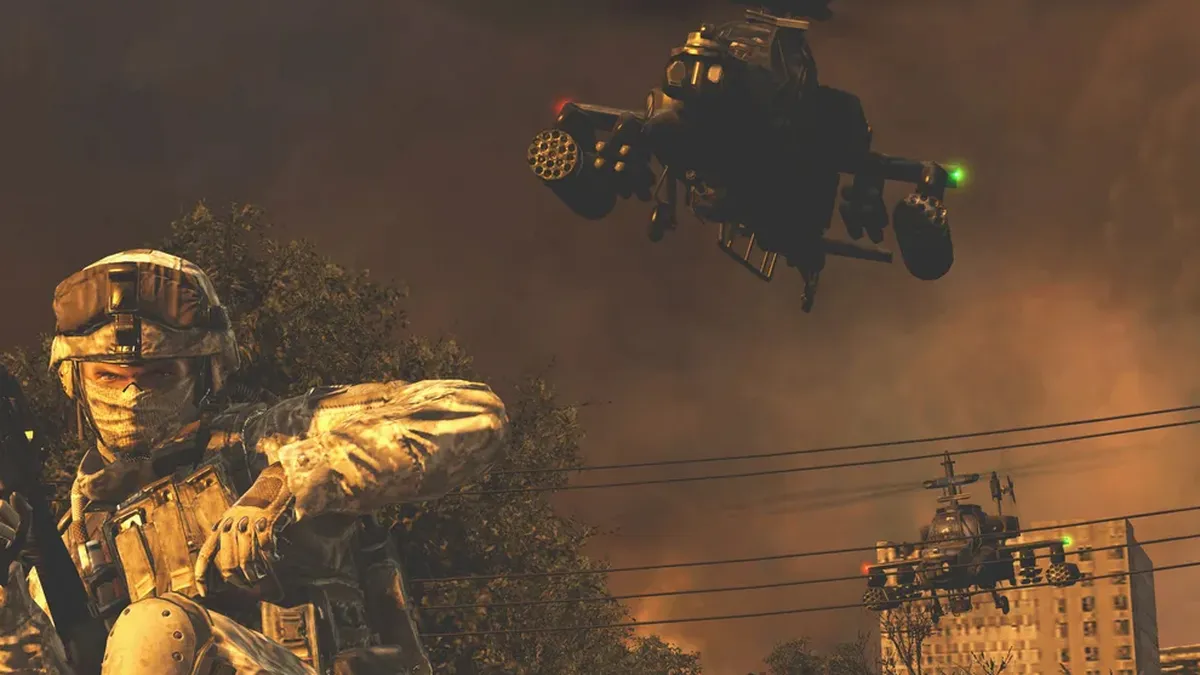
Much of the game’s visual memorability comes from how clearly the factions are distinguished — helmet shapes and uniform colors make friend-or-field identification possible mid-fight.
| Faction | Appearance traits | Recognition cues |
|---|---|---|
| US Army Rangers | Desert camo fatigues, MICH helmets with goggles | Light sand palette, US flag shoulder patch |
| Task Force 141 | Dark tactical wear, reinforced chest rigs | Darker tones, clearly apart from mass regulars |
| Russian military | Deep green/brown camo, steel helmets or winter ushankas | Hard, heavy Eastern European kit texture |
| Shadow Company | All-black fatigues, borderless elite gear | Shepherd’s private army, visibly better equipped than regulars |
| Civilians | Plain clothes, no armor | Present in the Rio and airport chaos zones — targets you must NOT engage |
3. Signature Character Designs Quick Reference#
Beyond factions, several core characters are instantly recognizable — the focus of fan art and screenshots alike.
| Character | Affiliation | Visual traits |
|---|---|---|
| Price | Task Force 141 | Graying beard, dark tactical gear, the steady veteran presence |
| Ghost | Task Force 141 | The iconic skull-pattern mask and headset — a single unmistakable symbol |
| Soap | Task Force 141 | Young, crisp combat fatigues; the assault-operator look in motion |
| Roach | Task Force 141 | Beret look, usually operating alongside Ghost |
| General Shepherd | US command | General’s uniform, gray hair — a deliberate contrast with frontline troops |
| Makarov | Russian ultras | Suit or overcoat, a stark counterpoint to everyone else’s uniforms |
4. Campaign Locations and When to Shoot Them#
The campaign is where the game’s location art is strongest; every scene offers at least one real, repeatable “camera position.”
| Scene | Visual traits | Best shooting moment |
|---|---|---|
| Siberian mountains | White expanse, minimal lines, hard cold light | The snowmobile descent — motion blur at its most dramatic |
| Rio de Janeiro favela | Dense alleys, colored walls, linked rooftops | Rooftop chase — use height differences for depth |
| Afghan desert village | Mud walls, dust, heat shimmer | The tank push — silhouettes through the dust |
| Washington D.C. streets | War-ruined urban landmarks | Open-street firefights, burning vehicles |
| White House lawn | The ruined national symbol | The lawn push — wrecked foreground against the building |
| Airport terminal | Flat modern interior, huge glass walls | Strictly the most controversial segment — do not linger on it in screenshots |
| Georgian safehouse | Rigid interior/exterior architectural lines | The download defense — interior light against muzzle flash |
5. Multiplayer Maps by Visual Register#
The multiplayer maps’ art value lies in each map having its own color script and spatial character. Sorted by visual register:
| Map | Space and palette | Screenshot angle |
|---|---|---|
| Terminal | Open airy interior, glass and metal reflections | Stable mid-range duel compositions |
| Highrise | Skyscraper top floors, vertical space, city backdrop | High-angle shots, rooftop outlines |
| Shipment | The smallest, most industrial container yard — cramped and fast | Close-quarters burst captures |
| Wasteland | A desert dig site centered on a signal tower | Overlook shots from the tower |
| Favela | Winding alleys, colored walls, rooftop walkways | The rooftop-linked depth |
| Estate | Forest manor, greenery meeting architecture | Layered trees against buildings |
| Sub Base | Gray-white rail yard, tracks and containers | Cold industrial snow scenes |
| Derail | Open flatland with scattered cover | Deep-focus wide compositions |
| Karachi | Mixed streets and rooftops, many attack routes | Street positions against the skyline |
6. Weapon Models and Recognition Points#
The gun models follow a clearly legible industrial logic — silhouette differences between weapon classes are big, which makes them prime appreciation material.
| Weapon | Visual identifiers | Design logic |
|---|---|---|
| Assault rifle (M4A1 family) | Squared receiver, long barrel with attachment rails | The “standard” modern rifle silhouette |
| Battle rifle (SCAR-H family) | Chunkier body, the heft of 7.62 | Reads heavier than 5.56 rifles |
| Burst rifle | Slim barrel, the shape language of burst-fire rhythm | Precise and restrained |
| SMG (UMP45 family) | Short, compact, wide-caliber classic SMG | Immediately reads as a room-clearing tool |
| High-RPM SMG (Vector family) | Distinctive lower magazine and compact frame | The tech look of extreme fire rate |
| High-capacity SMG (P90 family) | Bullpup with the magazine on top | One of the most recognizable outlines |
| Sniper rifle (Intervention family) | Long barrel, bolt action, big magnification scope | The one-shot heavy presence |
| Auto shotgun (AA-12 family) | Box magazine and thick body | Terrifying close-range suppression |
| Machine pistol (G18 family) | Tiny but full-auto | The extreme “akimbo sidearm” playstyle look |
7. HUD Layout and Information Hierarchy#
The interface is minimal, but its information hierarchy is worth studying — and worth hiding in screenshots.
- Center screen: crosshair and hit markers, directly reflecting fire state.
- Bottom left: current ammo and weapon-switch hints — the main persistent HUD info.
- Left killstreak bar: fills as kills accumulate, showing which streaks are armed.
- Minimap (radar): terrain, teammates, and enemies pinged by killstreaks.
- Top score and team info: both scores, time left, and objective prompts.
- Damage feedback: there is no health bar — the screen edges redden when hit and health regenerates after a few seconds, a deliberate break from many modern shooters.
8. Practical Screenshot Criteria#
There is no built-in photo mode, so screenshots depend on external tools and in-the-moment judgment. It comes down to two words: hide, and catch.
- Hide the HUD: compose so interface elements stay out of frame, or toggle interface options to cut HUD clutter and let the scene speak.
- Catch the light: explosions, tracers, and burning vehicles are the strongest visual anchors — press the key at peak fire.
- Catch the motion: reloads, sprints, jumps, and slides at maximum motion blur beat any standing pose.
- Go low: ground-level upward angles exaggerate weapon weight and character presence — ideal for armed-figure shots.
- Pick the right map and moment: wide desert maps want deep focus; cramped container maps want close-quarters bursts; snow and night maps suit the cold register.
- Post-processing direction: this is a cold realistic style — add moderate contrast, pull down highlights, unify color temperature toward documentary gray-cold, not saturation.
9. Appreciation Wrap-Up#
The art here is about one word: real. It does not lean on fantasy particles or spectacle; it uses recognizable real locations, cleanly separated faction designs, instantly readable weapon silhouettes, and a cold restrained palette to film modern war as a documentary. Shoot with “hide the HUD, catch the firelight, go low, find the extreme wide or the extremely cramped” in mind, and the aesthetic translates. For the actual routes through these locations, see the campaign walkthrough and multiplayer pages.