Escape Academy 2 Co-op Guide: Split-Screen & Online#
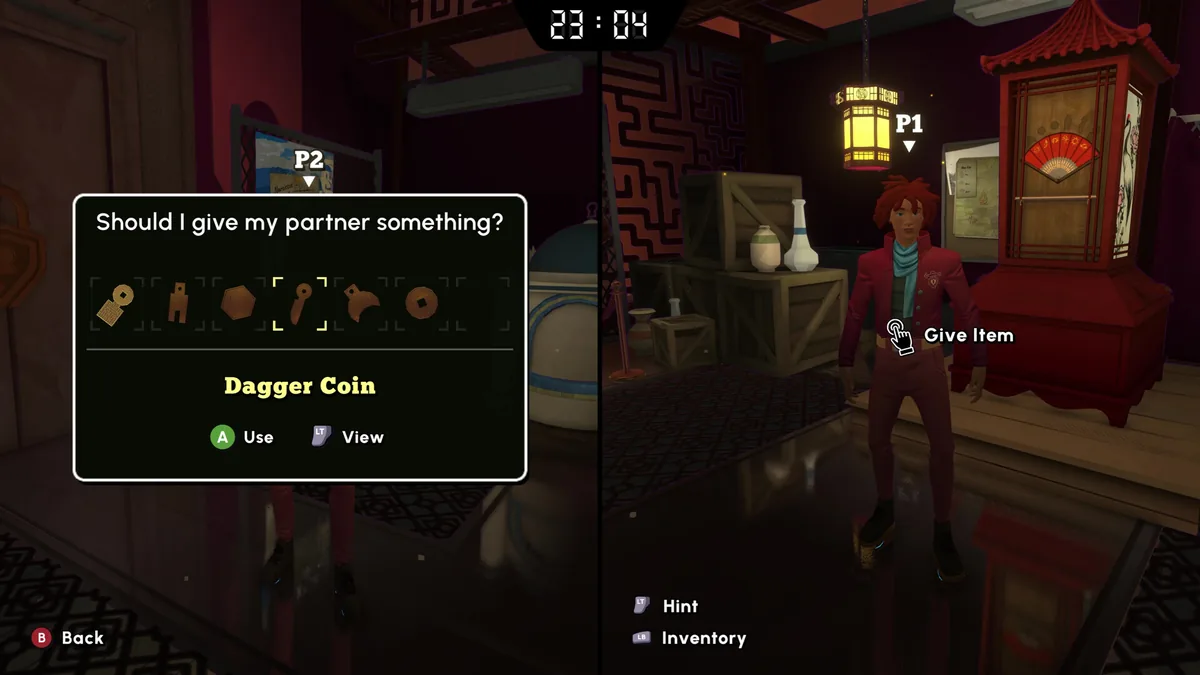
Co-op is not a bolt-on here; the game is built around it. The screen splits left and right, P2 and P1 tags sit at the top corners, a shared timer hangs in the middle, and lifting an item pops a “Should I give my partner something?” panel. The whole UI assumes two people are present.
The Hard Specs of Both Modes#
| Item | Local split-screen | Online co-op |
|---|---|---|
| Player cap | 2 | 2 |
| Screen | Vertical split (left/right halves) | Each player full screen |
| Extra hardware | One controller + keyboard/mouse, or two controllers | Two devices, two copies (or one player on Game Pass) |
| Cross-platform | N/A | Supported (per the Xbox store page) |
| Timer | Shared | Shared |
Two facts worth underlining:
First, the cap is two. Full stop. Chinese coverage claiming “4-player online” is wrong — the Xbox store page reads “Local co-op 2–2” and “Online co-op 2–2.” A four-person game night is out.
Second, the split is vertical, not horizontal. This matters in practice: each half-screen is portrait-ish, horizontal vision narrows, and clue-hunting needs more camera turns.
Why Split-Screen Scored 4.7/5#
Co-op is the highest-rated item in aggregate reviews — not because two can play, but because you can see what your partner is doing.
Concretely, the design solves split-screen’s three classic failures:
- You never know what your partner is up to. Here you do: their held item, their corner, which plaque they’re reading — all on the other half of the screen.
- Item handoff means running. Not here: the “Give Item” panel passes it instantly.
- Information asymmetry breeds parallel monologues. Split-screen puts both players in front of both information sets; discussion speed doubles.
TheGamer’s review puts the payoff plainly: one player reads the answer out loud while the other inputs the password, no running required. Polygon-family coverage called it “near-perfect couch co-op.”
Online Gives Up Half the Advantage#
Online players get their own fullscreen — sharper, wider — but cannot glance at their partner’s screen:
- Division of labor still works (you take your side, I take mine), but everything routes through voice;
- Item handoff still exists; you just have to know what your partner lacks first;
- The clue-hunt phase is visibly slower, because “let me peek” is gone.
Online therefore plays like two solo players sharing one save, rather than two people wedged into one sofa. The review line that co-op makes you “a student at the school rather than a lone escape genius” is really about the split-screen mode.
If logistics allow, play local split-screen. It is the definitive way to open this game.
The Honest Caveat: Co-op Content Is the Solo Content#
TheGamer named the game’s most substantive shortcoming: the puzzles in co-op are identical to solo. No co-op-exclusive rooms, no two-person simultaneous mechanisms.
Consequences:
- Once you and your friend finish a room, it’s spent for both of you — the answers are known;
- Replay means faster clear times;
- Beyond reruns and the announced-but-unscripted season pass, there is little reason to return.
Flip side: this is why the game is perfect for a first playthrough together and wrong for a replay together. Save the first pass for your partner — it’s the most valuable way to spend this game.
How to Divide Labor#
This division holds for most rooms, from live play:
| Phase | Suggested split |
|---|---|
| Entry sweep | Each scans one half of the room silently, then one-line reports: “I’ve got X” |
| Clue hunt | One works interactive objects (drawers, switches, pickups); one reads walls — text and patterns |
| Solving | One reads clues aloud, one operates inputs (keypads, dials, button banks) |
| Stuck | One presses hints while the other keeps searching — never both on the hint |
| Handoff | Whoever holds it passes it; don’t narrate “give me that thing” across the room |
The last line matters most: the Give Item function exists so you stop running. Many pairs never find it.
When Your Partner Is in Another City#
Three routes, easiest first:
- Online co-op: the direct path; two copies (or one subscription) and cross-platform play — an Xbox player and a Steam player connect fine.
- Steam Remote Play Together: one owner streams the game to a friend via invite link — the closest approximation of couch co-op over a wire, because the guest sees your split-screen.
- Cloud gaming + voice: workable if one side streams from Game Pass cloud, but input latency hurts on precision-input puzzles.
Controllers and Keyboard#
The game lists “full controller support”; both inputs work. Practical notes:
- Match device types on the couch (two controllers, or keyboard + controller) for symmetry;
- Fast camera sweeps for clue-hunting feel better on mouse;
- Number-pad entries are genuinely faster on a controller’s d-pad.
Verdict#
If you have one person willing to sit down and think with you, the co-op here earns its price — planned as a single first playthrough, not a replay loop. Solo is fully completable; it just leaves the 4.7-rated design on the table.
For where to meet up on campus and how errands chain, see the Chinese campus guide; for a clean opening hour, see the beginner guide.