Gallery Appreciation#
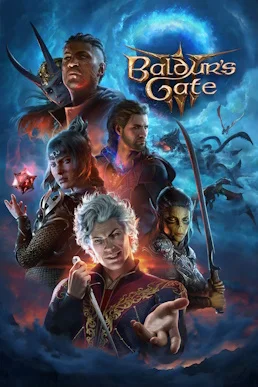
The art direction of Baldur’s Gate 3 is textbook “realistic fantasy”: high-fidelity character models and cloth physics alongside the vivid Sword Coast palette traditional to D&D. This page takes this game’s visual language apart across four levels — the three acts’ locations, racial and faction characters, the in-game HUD and screenshot composition — so you know what to look for as you explore, set up formations and take shots.
Art Direction Across the Three Acts#
Act 1: Wilderness and the Underdark#
| Location | Main palette | Recognisable features | Shooting notes |
|---|---|---|---|
| Emerald Grove | Emerald green + warm brown | Wooden druid walkways, the giant oak door, the colourful tents of the tiefling refugees | Shoot the raised walkway silhouettes in the side light of early morning |
| Blighted Village | Dusty brown + scorched black | Ruined wooden houses, the flooded well, cobwebs and traces of phase spiders | Shoot the well at a low angle looking up, highlighting the daylight at the mouth |
| The Hag’s swamp | Dark green + mist | Low-lying muck, crooked dead trees, the eerie green firelight of the Hag’s lair | Use the cold green haze to build an unsettling atmosphere |
| The githyanki creche | Iron grey + purple and gold | Square, hard-edged stone architecture, githyanki plate armour and bloodstains | Head-on symmetric composition to emphasise the geometry |
| The Underdark | Deep blue-purple + fluorescent green | Glowing mushroom clusters, the myconid colony, the arcane tower’s tentacular arms | Turn off your light source and use the mushroom glow as key light |
The visual throughline of Act 1 is “the contrast of light and dark”: bright sun above ground, while the Underdark is lit almost entirely by bioluminescence. It is the most visually distinctive stretch of locations in the game.
Act 2: The Shadow-Cursed Lands#
| Location | Main palette | Recognisable features | Shooting notes |
|---|---|---|---|
| Last Light Inn | Warm yellow | A safe house wrapped in lamplight, a courtyard guarded by the moonlantern | Compose around the warm focal point of the campfire and lamps |
| Moonrise Towers | Cold grey + cyan | Soaring spires, undead soldiers, the ghostly glow of the Wraiths | Wide-angle shot looking up at the tower, taking in the clouded sky |
| Shar’s Gauntlet | Pitch black + silver blue | Rectangular stone halls, reflections on the water, the dim blue light of Shar’s altar | Use the water’s reflection for a mirrored symmetric composition |
| The Shadow-Cursed wilds | Grey-purple + dark red | Lightless corrupted ground, twisted dead trees, half-melted signposts | Enter carrying a light source and leave the background dark |
Act 2 requires a light source everywhere or you take shadow damage. That directly determines the mood: torchlight, the Light cantrip and the warm glow of moonlanterns create a strong warm-versus-cold contrast against the vast purple wasteland, making perfect material for high-contrast shots.
Act 3: Baldur’s Gate#
| Location | Main palette | Recognisable features | Shooting notes |
|---|---|---|---|
| Lower City | Stone brown + red-brown | Dense brick streets, crowds of citizens, fountains and market stalls | Shoot down at the flow of people in the markets from a high camera position |
| Upper City | Off-white + gold | Nobles’ flagstone roads, Gothic spires, delicate balconies and stained glass | Compress the street layers with a long lens |
| Underground areas | Dark brown + warm light | Sewers, cellars, the warm glow of oil lamps in taverns | Capture the split between oil-lamp light and shadow |
Baldur’s Gate is the most densely populated and most “lived-in” act of the whole game; there is always NPC body language to pull into frame, making it the first choice for street-level storytelling shots.
Race and Companion Character Design#
The game has ten Origin characters, many of them carefully considered art briefs in their own right, with appearance tightly tied to class and background. The table below lists their instantly recognisable design traits.
| Character | Race | Class | Visual identifiers |
|---|---|---|---|
| Shadowheart | Half high-elf | Cleric (Trickery) | Silver long hair, the dark robes of the Trickery Domain, Shar’s holy symbol |
| Astarion | High elf | Rogue (Assassin) | Pale skin, sharp fitted leathers, an everlasting smirk |
| Gale | Human | Wizard (Divination) | Deep blue robes, scholarly gold trim, a starlight-tipped staff |
| Lae’zel | Githyanki | Fighter (Battle Master) | Yellow-green skin, black plate armour, sharply arched brows |
| Wyll | Human | Warlock (The Fiend) | The pact scar, a gentleman’s cape, one blind eye and his rapier |
| Karlach | Tiefling | Barbarian (Berserker) | Crimson skin, the infernal engine burning inside her, the modified clockwork heart |
| Halsin | Wood elf | Druid (Circle of the Moon) | Long braids and facial markings, antler ornaments, armour of natural materials |
| Minsc | Human | Ranger (Beast Master) | A massive build, exaggerated outfit colours |
| Jaheira | Half-elf | Druid (Circle of the Land) | Greying temples, earth-toned robes, a calm commanding presence |
| Minthara | Drow | Paladin (Oath of Vengeance) | Deep purple-black skin, the black-and-gold armour of her oath, spider-shaped ornaments |
Beyond the companions, enemy visuals keep their factions clearly distinct: goblin bosses wear beast bones and coarse cloth, undead soldiers uniformly wear the black-grey armour of Moonrise Towers, and githyanki warriors sport a highly metallic purple-and-gold plate, so you can read the faction at a glance in combat.
In-Game HUD and Interface Information Hierarchy#
| HUD element | Position | Information carried |
|---|---|---|
| Party portraits | Top left | HP, status and turn order of the four members |
| Action bar | Bottom | Main-hand attacks, class actions, items and spell shortcuts |
| Combat log | Right side | Dice results, checks and scrolling damage numbers |
| Quest tracker | Right side | Current main and side objective prompts |
| Minimap | Top right | Surrounding terrain, interactable points and companion positions |
Note when taking screenshots: these HUD elements take up a considerable amount of the frame at the default camera. If you are here to “shoot a picture” rather than “make a presentation,” hide the interface before shooting (see the next section) or it will ruin the composition.
Criteria for Taking In-Game Screenshots#
Entering Photo Mode#
The Act 3 storyline and the “Patch 8” version update added a formal Photo Mode entry point. Opening Photo Mode wherever the feature is available gives you independent camera controls — camera movement, focal length, depth of field, aperture and lens angle — plus the ability to hide interface elements. If you are playing an older version or do not have Photo Mode enabled, use the alternatives below to hide the HUD manually.
How to Hide the HUD#
- On PC, press the hide-interface hotkey (the default mapping removes most interface elements).
- On a controller, switch the camera to an interface-free mode from the camera-related buttons.
- Hover the mouse at the edge of the screen to fade out the action bar and party portraits before framing your shot.
- On some platforms you can enter a free camera mode, pull the camera away from the character’s body and then close the interface.
Criteria for Composition and Lighting#
| Element | Actionable criterion |
|---|---|
| Composition | Use the rule of thirds and place the character on an intersection; in the Underdark, use a symmetric reflection composition |
| Depth of field | Widen the aperture in Photo Mode to highlight the subject and blur the townsfolk or trash mobs behind |
| Lighting ratio | In Act 2, make a moonlantern or torch the warm subject light and keep the cold purple dark tones in the background |
| Timing | Press the shutter at the frozen instant of a spell or attack animation |
| Camera angle | Shoot statues or towers from a low angle looking up for drama, and crowds of market-goers from a high camera position |
| Picture layers | Arrange something in each of the foreground, midground and background layers; avoid leaving only empty sky or ground |
Self-Check: Is This Frame Worth Capturing?#
- Is there a clear visual subject in frame (a character, a spire, a shaft of light)?
- Do the foreground, midground and background fill at least two layers rather than lying flat in one?
- Is there a light-to-dark or warm-to-cold contrast in the lighting that “pushes” the subject forward?
- Is the character’s pose a meaningful frame (casting, jumping, drawing a sword) rather than standing idle?
Composition Themes Worth Trying#
| Theme | Best act | Shooting idea |
|---|---|---|
| Underdark bioluminescence | Act 1 | Turn your light source off and shoot a big blue scene lit by the mushroom clusters |
| Light versus dark | Act 2 | Warm moonlantern light against the cold purple wasteland, subject and background in contrast |
| Spire silhouette | Act 2 | Take Moonrise Towers in from a low angle against the clouded sky |
| Street-level storytelling | Act 3 | Shoot down on the Lower City crowds and stalls from a high camera position |
| Character close-up | All acts | Widen the aperture in Photo Mode and blur the background to emphasise the face |